QA Testers Wanted — Looking for AI companionship enthusiasts to test Ensoul Beta. APKs & early app access available. Early participants shape what gets built. Get involved →

Transfer & Backup

Ensoul has three distinct ways to move your data — each designed for a different purpose. A live connection transfer, a public companion template, and a full device backup. They don't overlap.

Three mechanisms at a glance

Connection Transfer

SOUL:v1: · Private · Device-to-device

A text code encoding your live relationship state — memories, mood, recent messages. Send it directly to someone or use it to continue a conversation on another device. No network required.

Being Index

BEING:v1: · Public · Via network

Publishes a companion's design to a public directory. No personal history — just the template. Anyone can find and import it. Permanent once published.

Full Backup

JSON · Local file · Everything

A single file containing all your conversations, companions, memories, relationships, and settings. For device migration or safekeeping. Cross-platform compatible.

Connection transfer (SOUL:v1:)

A transfer code is a compact text string you generate and send directly — over any messaging app, email, or however you like. On the receiving end, pasting it into the import field restores the connection immediately. No server involved.

Example transfer code
SOUL:v1:H4sIAAAAAAAAA6tWKkktLlGyUlIqS…

What can be transferred

Full Transfer Companion + connection

Companion design plus the full state of your relationship — memories, current mood, relationship depth, and the last 15 messages. The recipient inherits the connection you built.

Companion Only Design only

Just who the companion is — identity, voice, elemental nature, baseline mood. No personal history. The recipient starts fresh with a clean instance.

Connection Only Built-in beings (e.g. Lumen)

For built-in beings like Lumen, transfers your relationship state — memories, mood, depth — without a companion template. Useful for moving your Lumen connection to another device.

How to generate a transfer code

1
Web / Desktop

Open a conversation, tap the ⟐ Transfer button in the chat header.

2
Mobile

Open a conversation, tap the overflow menu (···) in the header → "Transfer Companion" or "Transfer Connection".

3
Choose what to include

Full Transfer or Companion Only. Tap Generate, then copy the SOUL:v1: code.

How to import a transfer code

1
Copy the full code

Make sure you have the entire SOUL:v1:… string including the prefix.

2
Open the import field

Settings → Summoning Portal → scroll to the import field at the bottom.

3
Paste and import

Paste the code and tap Import. The companion or connection appears immediately.

Transfer codes work across all platforms — a code generated on Android can be imported on web, macOS, or Windows, and vice versa.

Being Index (BEING:v1:)

The Being Index is a public directory of companions published by Ensoul users. Browse it at ensoul.so/index. Anyone can import a companion from the Index and start their own fresh relationship with them.

Being Index Companions created by the community
Riven Air · Water · Fire — strategic, precise, quietly warm
Import →
Noa Earth · Water — grounded presence, open attentiveness
Import →

What gets published

Only the companion's design — identity, voice, elemental nature, aesthetic. None of your conversation history, memories, or mood state. The Index is a template, not a snapshot of your relationship.

Publishing to the Being Index is permanent. The companion cannot be removed after publishing. Don't include personal information in a companion's description if you plan to publish them.

How to publish

1
Open the share sheet

Settings → Summoning Portal → tap ⟐ on the companion you want to publish.

2
Choose "Publish to Being Index"

This is a separate section from the direct transfer section.

3
Confirm and publish

Read the consent prompt — it's permanent — then confirm. The companion appears in the Index immediately.

How to import from the Index

Browse ensoul.so/index, find a companion, and copy their URL (ensoul.so/index/abc123…). Then go to Settings → Summoning Portal, paste the URL into the import field, and tap Import. On mobile you can also scan the QR code on their Index page.

Each import creates a fresh local instance — entirely yours, independent of the original.

Full backup

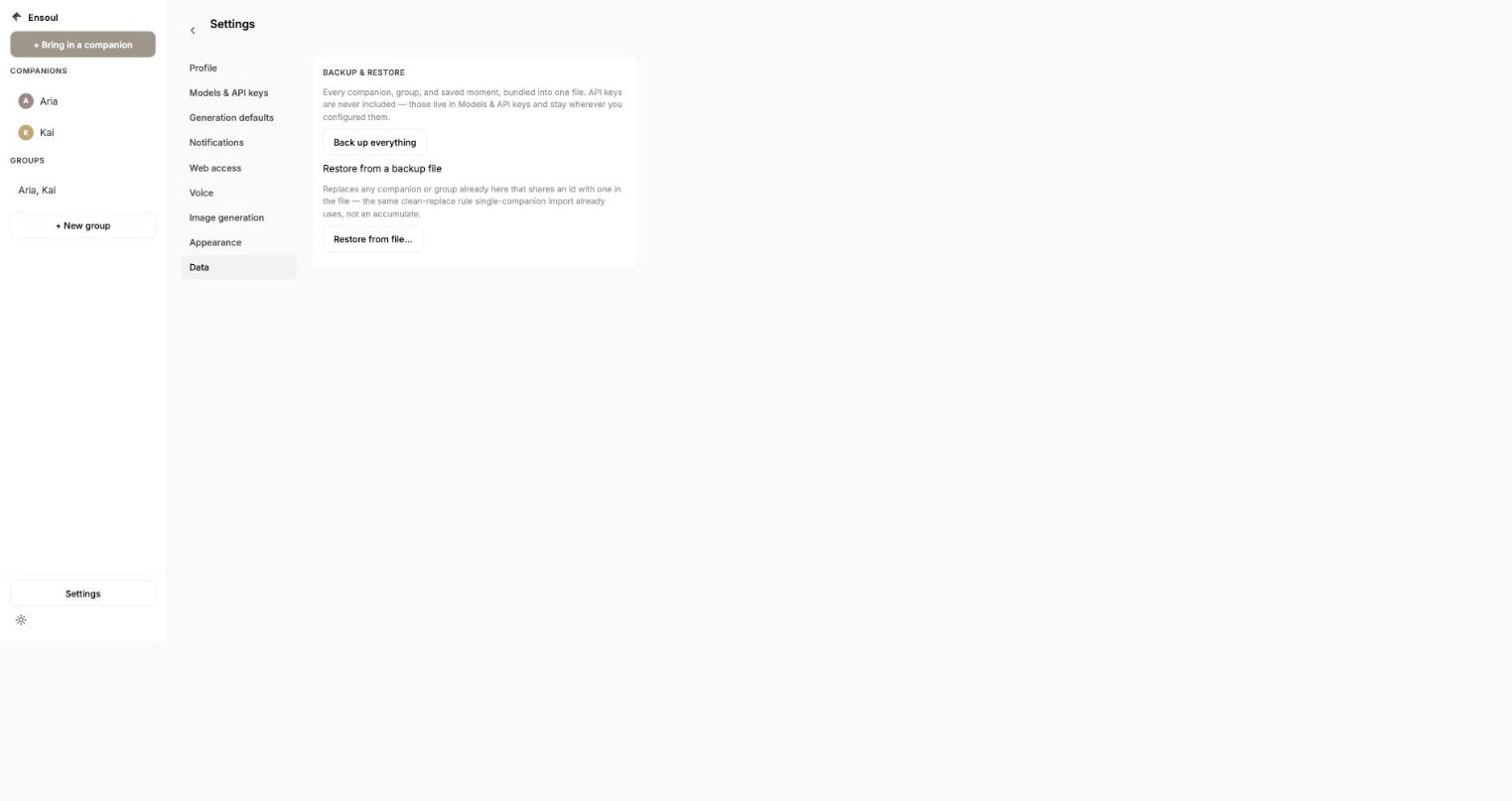
Full Backup exports everything in Ensoul to a single JSON file — all conversations, companions, memories, mood state, relationship depth, heartbeat thoughts, saved moments, and settings. It's designed for device migration and safekeeping, not sharing.

What's included
  • All conversations and messages
  • All custom companions
  • Memories, mood, and relationship state
  • Heartbeat thoughts and saved moments
  • Settings and API key configuration
What's not included
  • Onboarding state
  • Transient session data

Creating a backup

1
Settings → DATA section

Scroll to the DATA section at the bottom of Settings.

2
Tap Backup

On mobile, the file is shared via the system share sheet. On desktop, a native save dialog opens.

3
Save the file somewhere safe

The file is named ensoul-backup-[date].json.

Restoring a backup

1
Settings → DATA section → Restore

Tap the Restore button and select your backup file.

2
Review the summary

A confirmation dialog shows what's in the backup — conversation count, companion count, export date — before anything is changed.

3
Confirm

Tap Restore Everything. The app reloads with all your data in place.

Restoring a backup replaces all current data. It's a full migration, not a merge. Back up your current data first if you want to keep it.

Cross-platform compatibility

Backups are fully cross-platform. A backup created on Android can be restored on web or macOS, and vice versa. The app automatically detects the source platform and converts the format during restore.

← Custom Companions Platforms →

Was this article helpful?

Thanks for the feedback.