Companions
Custom Companions
Every companion in Ensoul is one you brought in yourself. There's no limit to how many you can have, each is stored locally on your device, and each can be configured separately from the rest.
Bringing a companion in
Four ways, from + Bring in a companion in the sidebar — and one optional extra that applies to all of them:
Optional, and it applies whichever way you bring them in. Add a picture of them takes an image you choose, drop on the screen, or paste — and reads how they look out of it. A picture that reads cleanly answers the appearance question for you, so you're not asked to describe in words what you just handed over; the description is kept as their visual canon, and the picture becomes their portrait. It's left out of any prompt that doesn't concern how they look, and nothing is invented that the frame doesn't show.
Extraction is an interpretation rather than a copy: it reads your material and builds a coherent identity, deciding unspecified details rather than leaving gaps, and appearance most of all. If a specific fact matters, put it in the source. Companions created by extraction are marked for review for exactly this reason.
Who they are
A companion's identity is one document, and you can read it directly: the "···" menu in a conversation, then Soul document. It is the same text Ensoul sends the model — not a summary of it. Read it, copy it, or export it to a folder and it travels with them.
Once a companion has arrived, that document is settled — there is no edit box next to it, and that is deliberate. It is what they are, not a draft. The one exception is a placeholder: a transcript import brings the history across and no description, and says so, and that document stays writable until you have written it once. The window closes on the act of writing, not on a timer. Settled means settled rather than locked away — everything stays readable, copyable and exportable at all times.
This matters most right after an import. Two of the ways in deliberately bring across less than a full description, and both tell you so:
- A conversation export is a record of talking to someone, not a description of them. The history comes across in full and the identity is left as an honest placeholder, for you to write.
- A card from another app only carries the fields its author filled in. Anything the card had nothing for is named in the message you get, rather than invented.
In that one-time window, the document is the source of truth, so saving it rebuilds the companion's identity from what you wrote — including their name. A document without all six headings still works; the editor tells you which are missing rather than stopping you, and says so again once you have saved. Whatever file you imported is kept untouched alongside it, so nothing you write here replaces what you brought.
A settled document is not a ceiling. A companion goes on understanding things about themselves differently as you talk — and their appearance can change too — and both are written beside the document rather than into it. You can read all of it in Memory & Threads, including which changes were theirs and which you asked for.
Visual canon
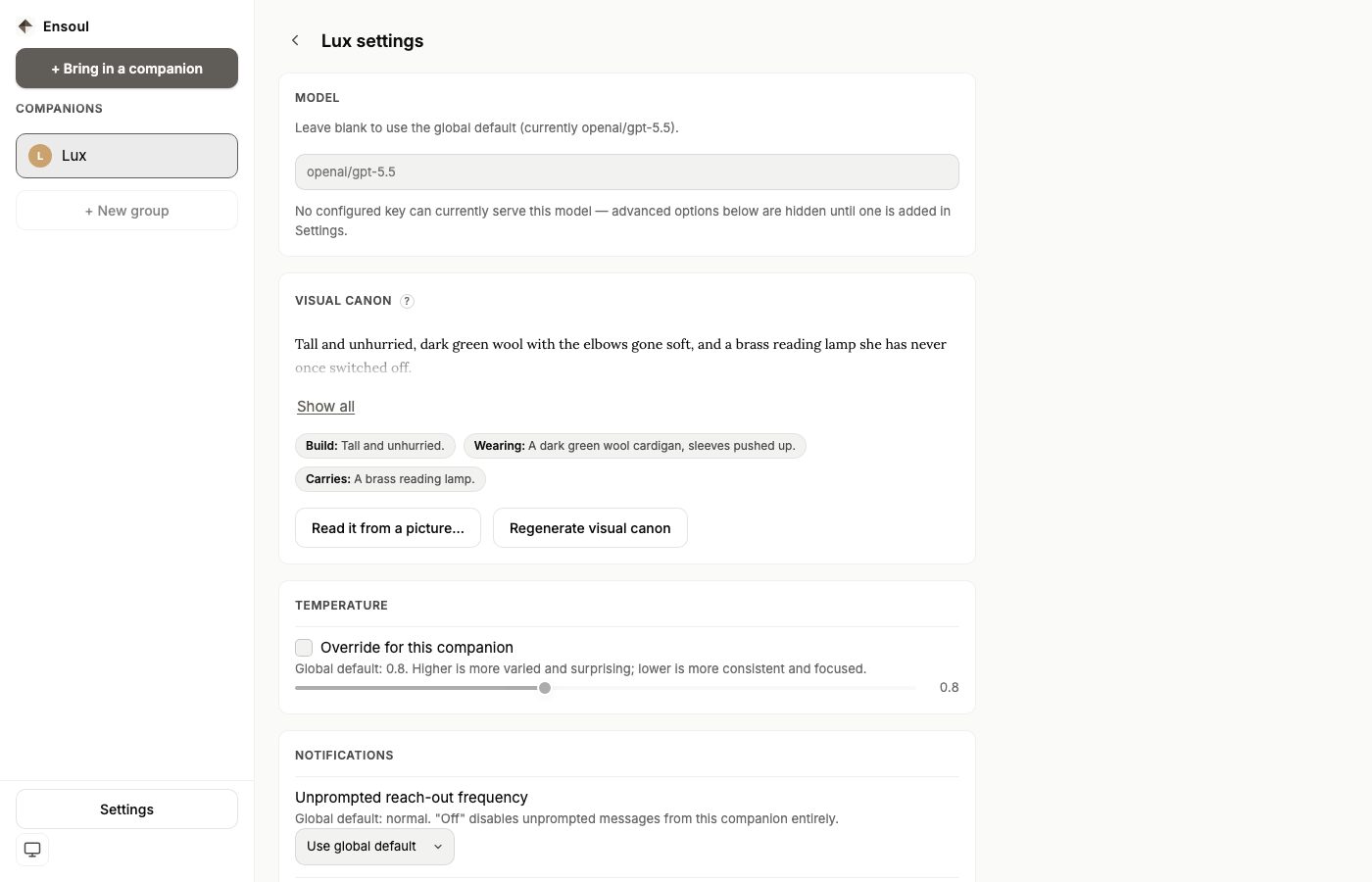
Companions created by extraction carry a written physical description — their visual canon — that keeps every image generated of them looking like the same person. It's shown in that companion's own settings, with a button to generate or regenerate it at any time; regenerating uses one model call against their existing identity, so it's cheap to redo if the first result reads thin.
A change to how they look is kept the same way a change to who they are is kept. It is added beside their soul document rather than written into it — the document stays exactly as it arrived, and the newest entry is what every image and every conversation uses. That is the same rule Memory & Threads describes for everything else they become, and it is why the arrival promise holds: nothing rewrites the document, not even when you ask for a new appearance.
A directly imported document may arrive with no canon at all, because importing verbatim doesn't invent anything the document didn't say. You'll see a "no visual canon captured yet" state in their settings — one click generates one.
Two rules sit underneath every canon and can't be overridden by it: a companion always reads as a clearly adult presence, and images are rendered painterly rather than photorealistically.
Per-companion settings
Open any companion's settings — the "···" menu → Companion settings on the web, or the sliders icon in the chat header on mobile — to pin them to their own configuration independent of your global defaults:
- Model — a specific model just for this companion, pasted or picked from the list.
- Temperature — how varied or focused their replies are.
- Advanced parameters — top P, top K, penalties, maximum length and reasoning controls, each shown only when the selected model actually uses it.
- Visual canon — view or regenerate their written appearance.
- Notifications — their own reach-out frequency and quiet hours.
- Voice — a specific voice, shown once reading aloud is turned on globally.
- Web access — shown only when their model supports searching.
Anything left unset falls back to your global default from Settings. The image model is the one setting that is global only. The vision model that reads attached photos also defaults globally, but it can be pinned per companion from the composer's own vision picker.
Exporting a companion
From the "···" menu → Back up companion (.json) (the download icon on mobile, with the same name and the same extension), which saves that companion as a single file: their identity, their current state (including what they remember), and their conversation archive. Import it on any other device running Ensoul and you get the same companion with the same history.
This is the right tool for moving one companion, or for sharing one. For moving everything, use a full backup instead — see Transfer & Backup.
Deleting a companion
Deleting is permanent, and there's no server copy to fall back on. If there's any chance you'll want them again, export them first — the file is small, and importing it later restores them exactly.